
Art Quest · Horror Cinema · MORPHEUS
Four messengers.One window, payment in a click.
Customers of the quests, the cinema and the theatre write on MAX, Telegram, VK and Avito. The conversations ran in the chats of the previous CRM, and managers tracked payments themselves. We brought all four channels into one window of the company cabinet. Each conversation attaches to the client and the deal automatically or by the manager’s choice, a prepayment link comes from one button, and the payment reminder reaches the customer by itself.
Live · conversations in four channels, links and templates, automatic prepayment reminders · since October 2026
Customer writes
- MAX
- Telegram
- VK
- Avito
One manager window
Payment in a click
The cabinet reminds
- 4messengers in one windowMAX, Telegram, VK, Avito
- 7 sfor an Avito message to reach the cabinettest message, 20 October
- 3,998messages in 21 days9 to 29 October 2026
- 16ready templates with auto-fill
Four channels, one screen
VK asks about a children’s party, Telegram confirms a time, MAX wants an address, Avito waits for an answer about a listing.
All four streams flow into one list. The client and the deal sit next to the conversation. The manager replies without opening a messenger, and the customer gets the answer where they wrote.
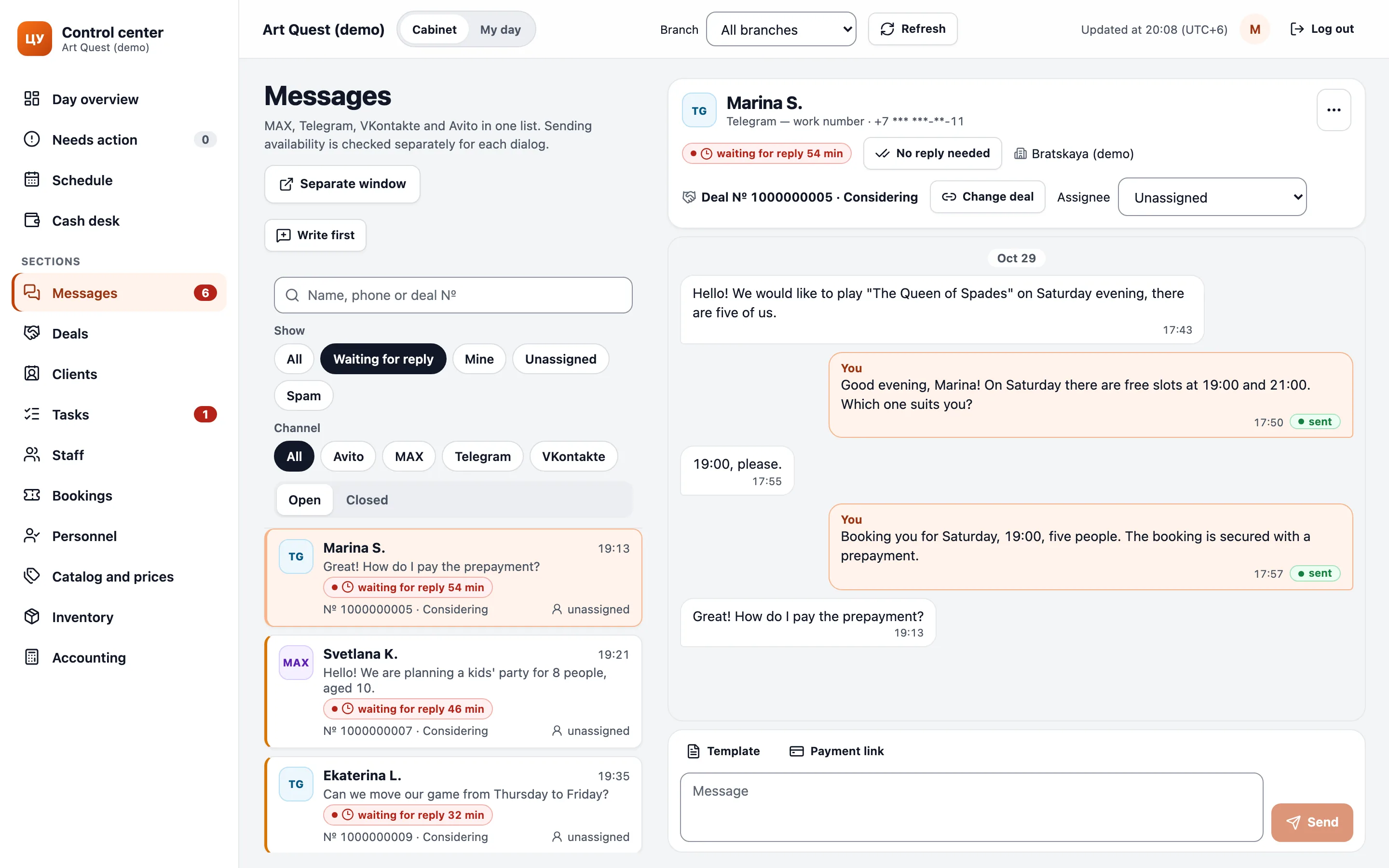
- 747conversations in the cabinetVK 515, MAX 138, Telegram 72, Avito 22
- 7 sfrom an Avito message to the cabinettest message, 20 October
Replying like in an ordinary messenger
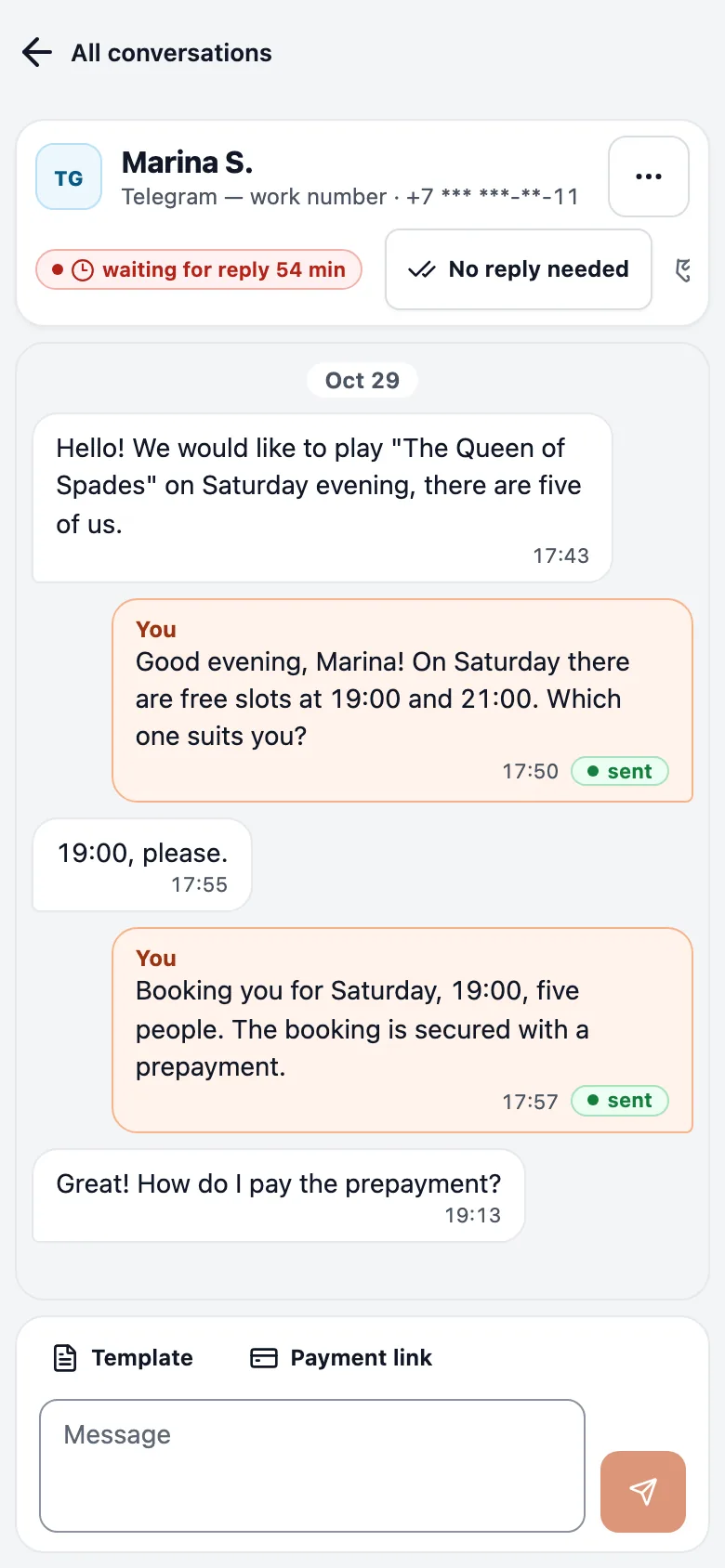
The manager types and presses Enter. The window refreshes itself every 5 to 10 seconds, so new messages appear without a reload. On a phone the conversation opens full screen.
The conversation finds the client on its own, and the deal is picked automatically or linked by the manager. If the customer writes for the first time, the manager creates the deal right from the conversation. If the deal is wrong, a search swaps it.
- First
Write by phone number
The manager enters a number and the MAX or Telegram conversation is already linked to the client and the deal. We built and released this in about 2 h 10 min (including the wait in the release queue).
- Order
Spam and “No reply needed”
Spam and messages that need no answer leave the queue. The list keeps only people who are waiting for an answer.
- Duplicates
Merge clients
One person ended up in the database twice. Duplicate cards merge into one.
Three weeks, almost four thousand messages
Between 9 and 29 October, the cabinet recorded 3,998 messages. Managers sent 799, the bot sent 2,471, and customers wrote 700.
Bot and manager messages sit in one conversation thread.
- 3,998messages9 to 29 October 2026
- 2,471sent by the bot
- 799sent by managers
- 700written by customers
For comparison: the previous CRM recorded 77,668 messages in 10,483 conversations over 2.8 years, across all its channels.
A payment link from one button
In the previous CRM’s templates, prepayment was a card transfer: the customer sent a receipt and the manager checked it by hand.
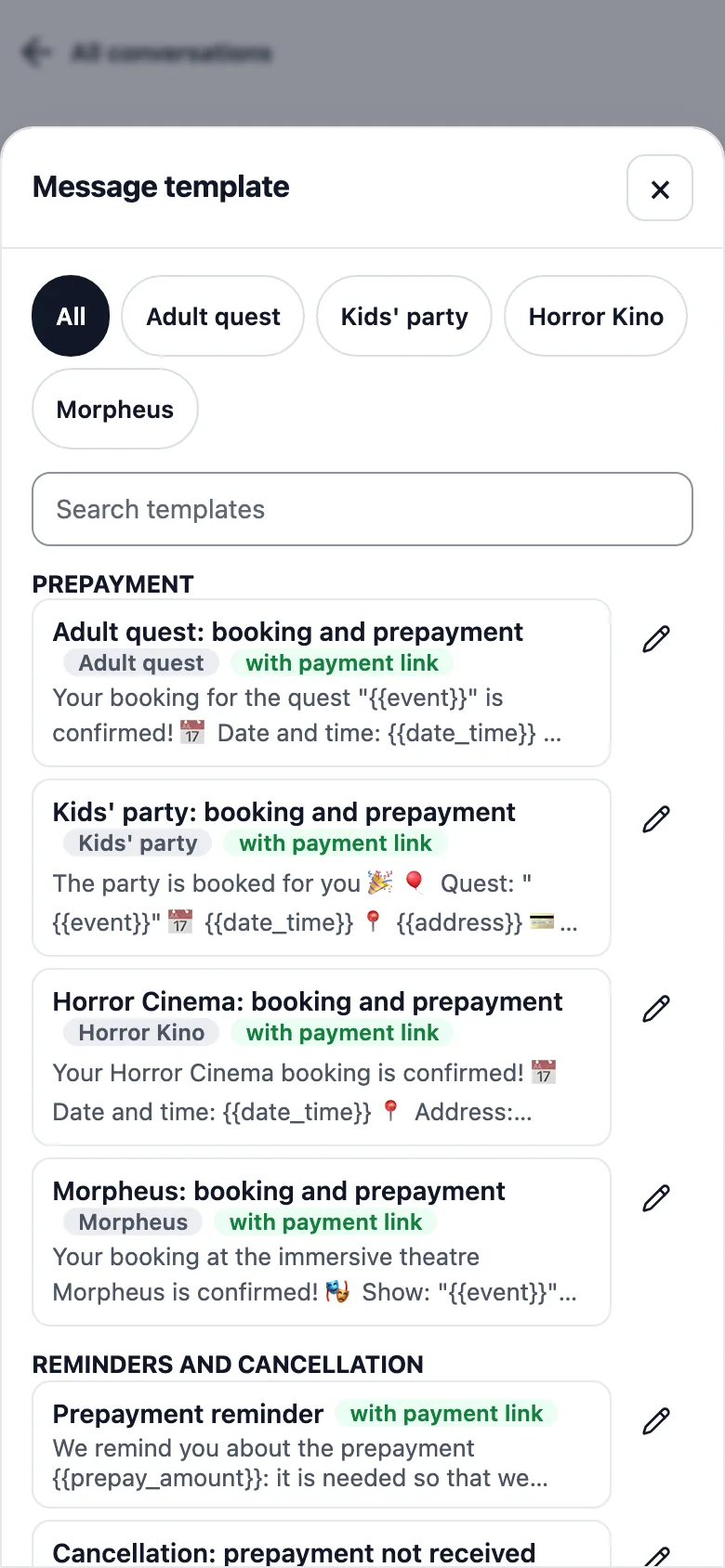
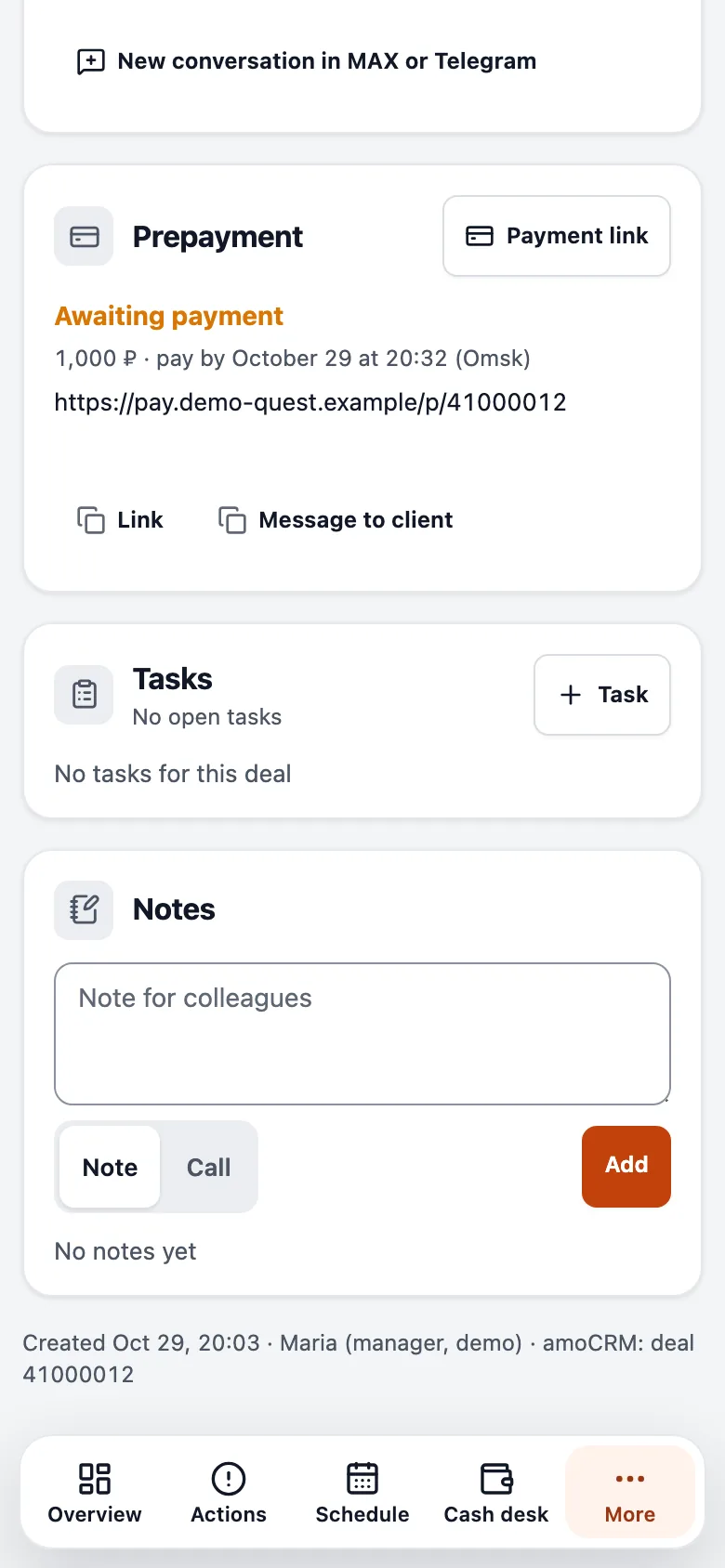
Now two buttons sit above the reply field: “Template” and “Payment link”. The manager presses the second one and a YooKassa link with a short Link Builder address drops into the message. The system picks the amount and the deadline by event.
Before
- A transfer to a card
- A receipt from the customer
- The receipt checked by hand
- The deadline written into the template text
After
- A payment link from one button
- Payment runs in YooKassa and the status shows in the deal
- A “Prepayment” block in the deal card
- The system works out the deadline
- Prepayment
1,000 and 2,000 roubles
1,000 roubles for an adult quest or the cinema, 2,000 roubles for MORPHEUS and a children’s party.
- Deadline
1 hour / 48 h
Through a manager the customer has 1 hour to pay, and a children’s party gets 48 hours.
- Templates
16 ready texts
Carried over from the previous CRM. The templates fill in the name, event, date and time, amount, deadline and link.
We built and released links and templates in about 1 h 20 min, together with a change of the booking window in the sales service. Templates are grouped: prepayment, reminders and cancellation, after booking, about the projects. The picker offers the ones that fit the deal’s event.
The cabinet reminds the customer by itself
The link is out and the customer has put the phone down. Now the cabinet decides whom to nudge and when. Once the manager has really sent the link, the system sends reminders in the same messenger.
For a one-hour window, reminders come 30 and 10 minutes before the end. For a children’s party with a 48-hour window, they come 24 hours and 2 hours before.
1-hour windowbooking through a manager
- Link sent
- Reminder 30 minutes before
- Reminder 10 minutes before
- Payment deadline
Children’s party48-hour window
- Link sent
- Reminder 24 hours before
- Reminder 2 hours before
- Payment deadline
Quiet hours22:00–09:00 Omsk time: the reminder moves to 09:00
Stays silentFor paid bookings, closed deals and spam. Checks the payment status before every reminder
The cabinet stays quiet at night. A reminder that falls between 22:00 and 09:00 Omsk time moves to 09:00. It does not write about paid bookings, closed deals or spam conversations, and it checks the payment status before every reminder.
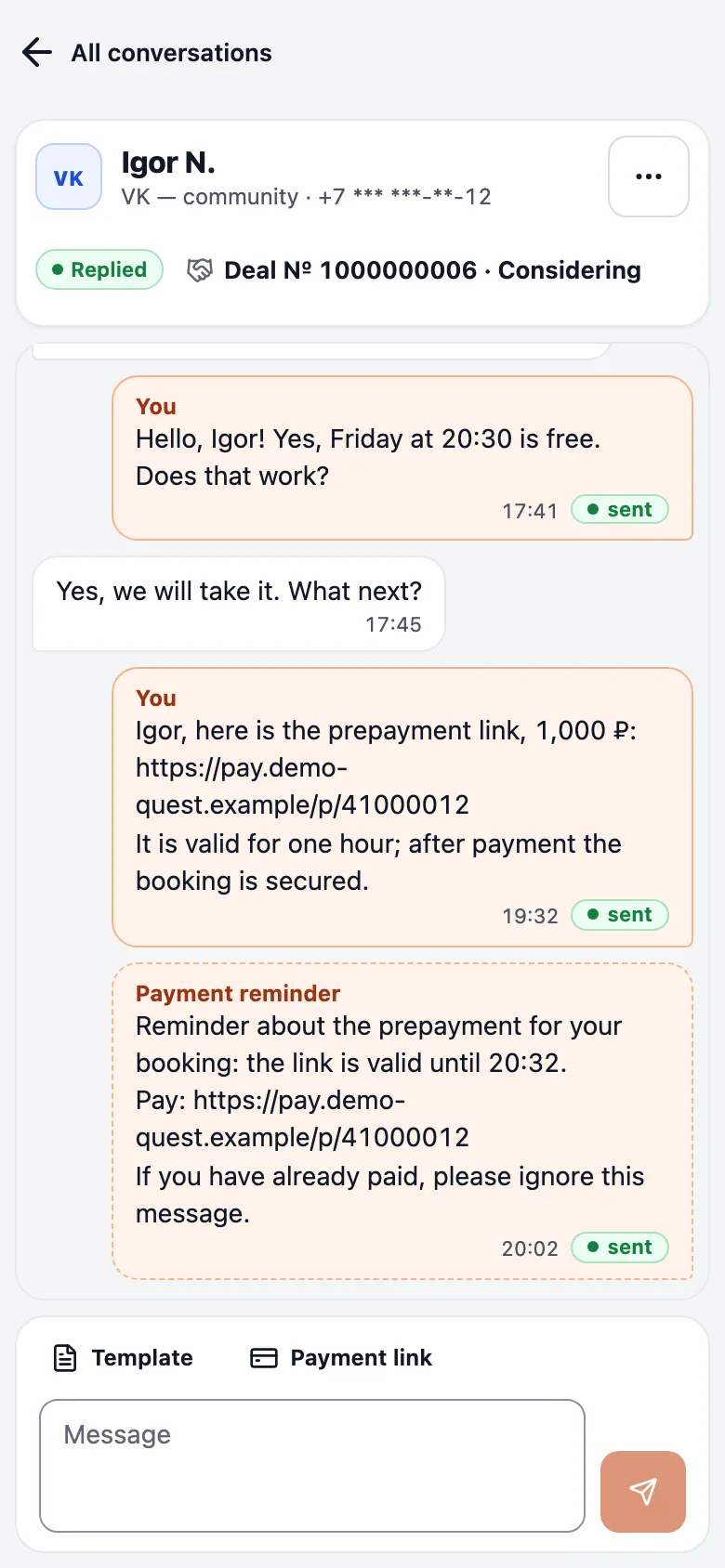
- 19:01 and 19:21two reminders sent in the test runOmsk time, test deal, the link was valid until 19:31
- ≈1 h 05 minto build the reminders up to releasethen about 2 h of test runs
What stops a stray message
Messages to customers do not forgive mistakes. If a manager presses send twice on a bad connection, no duplicate goes out: every action carries a key and a repeat is recognised. A reminder exists once as well, and a server restart cannot multiply it.
Until the manager sends the first message, no empty conversation is created. An abandoned window leaves no clutter in the lists or in the “Waiting for a reply” queue. The phone number shows masked in the window and never appears in the address bar.
- Duplicates
Pressing the same button again sends nothing twice
After a dropped connection a manager can press again without risk.
- Reminders
One reminder per deadline and link
A second worker or a restart does not create a second reminder.
- Privacy
Number masked and kept out of the address
The customer’s phone never reaches the browser address bar.
How it was built
Three features in one working day
On 20 October, during an outage of the previous CRM, replies, links and reminders were needed in one place. We shipped the features one at a time and tested them.
“Write first” took about 2 h 10 min, links and templates about 1 h 20 min, and reminders about 1 h 05 min up to release. About 2 more hours went on test runs on a test number, and the reminders went live the same evening.
- The companySet the rules: who pays and how much, payment windows, quiet hours, what to say to the customer.
- SemCueFour channel adapters, the conversation window, payment links, templates, the reminder scheduler and pre-release checks.
- ManagersWork from one window and use ready texts instead of typing them.
For technical readers
For technical readers
- Channels
- MAX, Telegram, VK and Avito adapters share one interface: polling for reads, a queue for sends, per-channel limits.
- Linking
- A conversation finds the client by channel identifier and phone number, and links the deal automatically or on the manager’s choice.
- Payment
- The sales service issues the link through YooKassa with a short Link Builder address. Pressing again returns the same live link.
- Reminders
- A worker job plans each deadline from the window length and quiet hours, and asks for the payment status before sending. One row per link and deadline.
- Reliability
- An idempotency key on every send, a lock per number on the first message, and separate switches for reading, replying and reminders.
Where the numbers come from
Sources
- The inbox module description and the cabinet release log, 16 to 20 October 2026.
- Aggregates from the cabinet database on 29 October 2026: conversation and message counts, with no message text or client names.
- The migration report from the previous CRM: message volume over 2.8 years.
- The work time log for 20 October 2026.
- A test run of reminders on a test deal, 20 October 2026.
Next system
Staff portal →